Architecture
How Dispatch is structured
Business logic lives in packages/core. The CLI, local MCP server, and remote MCP server are all thin adapters around it, so agents, scripts, and humans use the same implementation.
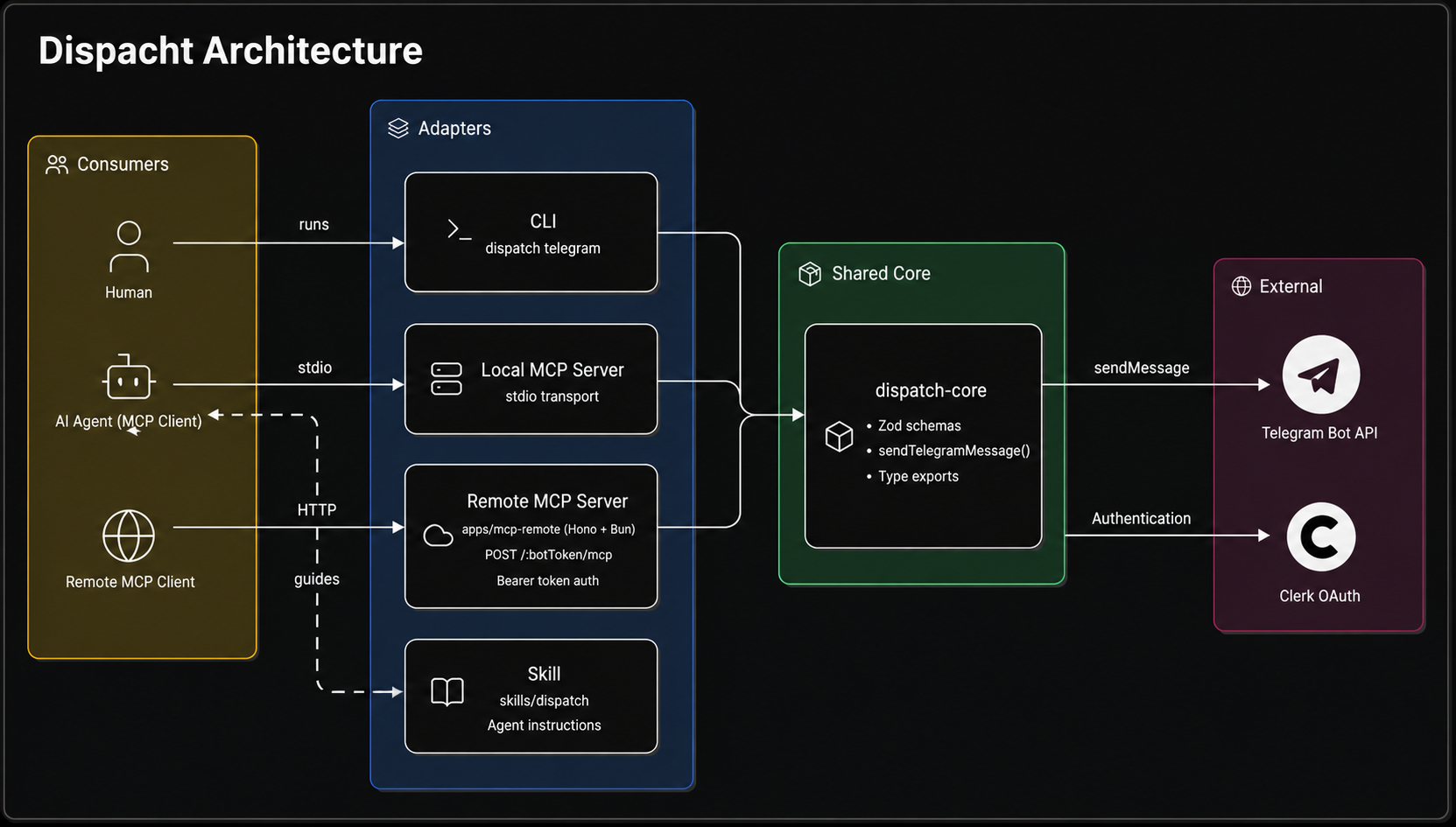
Dispatch Core
packages/core- Zod schemas for shared inputs and outputs.
- Operation functions such as sendTelegramMessage.
- Type exports derived from schemas.
- No CLI imports, MCP SDK imports, terminal output or prompts.
CLI
packages/cli- Defines dispatch telegram <chatId> <message>.
- Parses command arguments with Commander.
- Calls @amarnath00/dispatch-core functions.
- Prints readable output by default.
- Supports --json for scriptable and agent-readable output.
Local MCP
packages/mcp-local- Creates an MCP stdio server.
- Registers a telegram tool backed by @amarnath00/dispatch-core.
- Uses the shared Telegram message input schema.
- Returns both content and structuredContent.
Remote MCP
apps/mcp-remote- Creates a Hono HTTP app exposing /:botToken/mcp, run by Bun in development.
- Registers a telegram tool backed by @amarnath00/dispatch-core.
- Reads the Telegram bot token from the URL path per request.
- Keeps the token out of the MCP tool input schema.
- Closes the per-request MCP server after handling the request.
Skill
skills/dispatch- Prefers the MCP telegram tool when available.
- Documents CLI fallback usage.
- Explains that @amarnath00/dispatch-core is an implementation detail.
- Avoids duplicating business logic.
Telegram Bot API
External- The concrete external service Dispatch integrates with in its reference operation.
- All adapters route through the core's sendTelegramMessage, which calls the Telegram Bot API.
Clerk OAuth
External- Protects the remote MCP server.
- Unauthenticated requests get 401 with a WWW-Authenticate header pointing at /.well-known/oauth-protected-resource/:botToken/mcp.
- MCP OAuth clients use that to drive the login flow.